Your social media,
handled.
Set up your business once — your story, your tone, your images. AI writes a steady run of on-brand posts, you approve them, and they schedule and publish themselves.
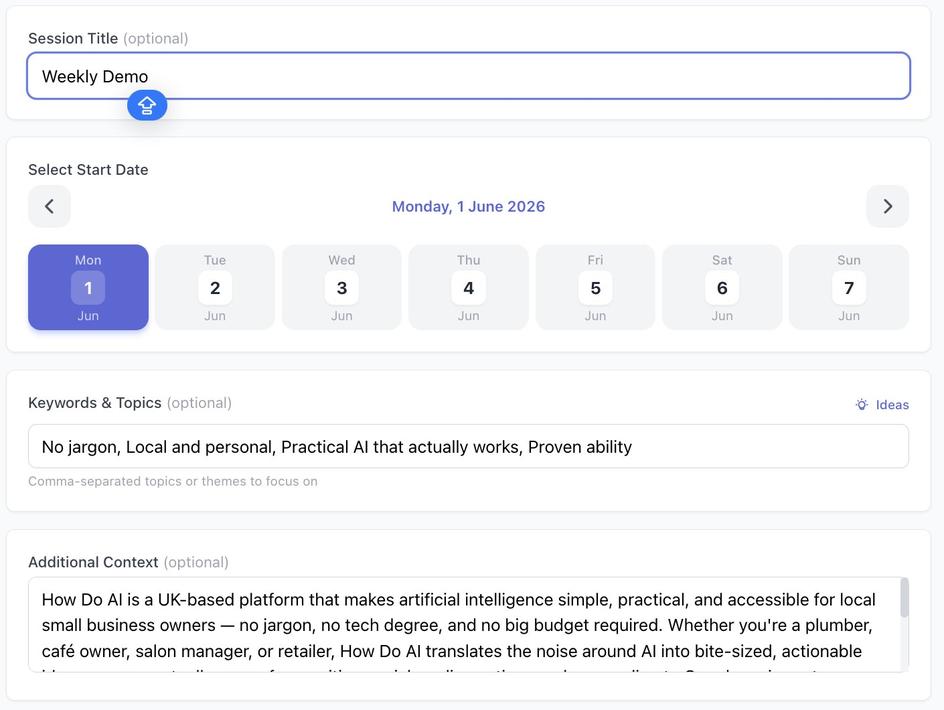
Generate a series of posts
Point it at your business context and images, pick your platforms, and AI writes a full run of on-brand posts in one go — captions, hashtags and images together.
- Works from your business context or uploaded images
- Posts for Instagram, Facebook and Twitter/X
- Optional AI-generated images, scheduled for you
Review and approve
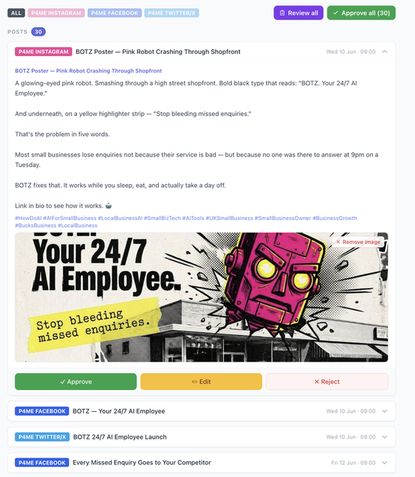
Every post comes back with the copy and image side by side. Approve the ones you love, tweak the rest, reject anything that misses — nothing's locked in.
- See exactly what will go live
- Edit a post inline, or approve in bulk
- Full control before anything publishes
Schedule — and it posts itself
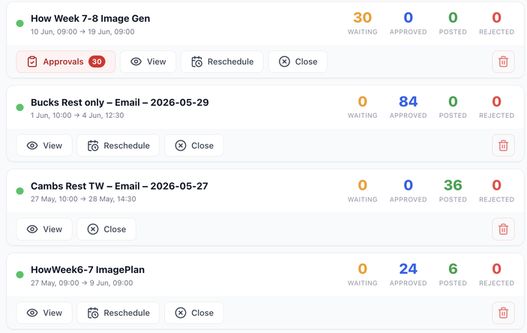
Approved posts drop into the schedule and publish automatically. Track what's waiting, what's posted, and what's coming up — all from one dashboard.
- Auto-publishes across your platforms
- Clear pipeline — waiting, approved, posted
- Reschedule or pause any time
Frequently asked questions
How does AI social media management actually work?
You give us your website, your usual tone and any past posts you like. Our AI generates a run of on-brand posts — a mix of promo, educational, behind-the-scenes and reactive content — that you review in one batch. Approved posts schedule themselves across your connected accounts (Facebook, Instagram, LinkedIn, X). Fresh batches drop weekly.
How much does it cost per month?
Social media management can be bought on its own as a monthly add-on, covering all connected accounts, weekly post batches, a monthly performance snapshot and a round of tone tuning. It is also included in an active Admin plan alongside lead generation and review handling, so if you want more than one of those it is usually cheaper as a plan. Both are quoted after a free call.
How many posts per week will I get?
A standard cadence is 3 posts per week per primary channel — enough to stay visible without becoming annoying. You can scale up to daily (7/week) or dial down to 1 per week without changing the price. The mix and cadence per channel is tuned to whatever performs best for your audience over time.
Will the posts sound like me or like corporate AI slop?
Like you. The AI is trained on your website, past posts, tone samples and industry — and every post is reviewed and approved by you before it goes live. If a batch reads off, you reject it in one click with a one-line note and the next batch reflects the feedback. Retuning is included and typically ships within a working day.
What platforms do you support?
Facebook Pages, Instagram (feed and Stories), LinkedIn Company and personal profiles, and X (Twitter). Google Business Profile posts are handled as part of Admin review handling. TikTok and YouTube Shorts are on the roadmap but not currently in the standard bolt-on. Additional platforms can be added as a custom build.
What about images and video?
Images are AI-generated and hand-picked to match your brand look, or pulled from a stock library, or from any assets you upload. Short-form video (reels, stories) can be scripted and generated for an additional charge, but it is not part of the standard social add-on. Photo posts using your own imagery are included at no extra cost.
How do you handle replies and DMs?
Reply management is a separate service — the social add-on covers posting only. If you want DM triage, comment replies and review responses too, that is Review Handling, which covers Google, Facebook and Instagram. If you want both, they are usually better value bundled into a single monthly plan than bought separately. We will price it either way on a free call so you can see the difference.
Can I schedule around a holiday or campaign?
Yes. Tell us about a holiday, sale, launch or seasonal push and we tune that week’s batch accordingly — Christmas hours, Black Friday copy, spring launch, whatever. You can also pause posting for a week or a month (holiday, quiet season) without cancelling, and paused months are not billed.
Want your socials running themselves?
We'll set up social media management in How Do AI Admin around your business — and show you how to run it. Start with a free chat.
Book a free discovery call